About The Cyberwolfe

The owner of dis 'ere blog.

More Edumacation

Now that you have read through the first course, it is time to move on to the next:

Wolfe’s Guide To Computers 102 – What to do when things go Wrong

“The computer allows you to make mistakes faster than any other invention, with the possible exception of handguns and tequila.”
– Mitch Ratcliffe

Things will eventually go wrong with your computer; the steps below will be helpful in determining exactly what it was, and should be followed in this order.

1) Reboot the computer.

Microsoft Windows Operating Systems have a number of faults in them that will on occasion cause your computer to freeze up, spaz out or generally quit working. If this happens, you will normally just need to reboot your computer to solve the problem.

Click on Start, then click on “Shut Down” and choose “Reboot” at the pop-up window. If this option never becomes available (wait at least ten minutes) then you may perform a Hard Shutdown by pressing and holding in the Power button on the computer for 5 seconds. This should shut down the computer. Let it sit for a 10-count then press and release the power button to start the computer again.

As a last-ditch effort, you could pull the power cord out of the computer – it should be noted that this could cause permanent damage to the machine, so it should only be done as a last resort.

If the problem persists, continue with the next steps.

2) Check all of the cables on the computer and the peripherals. Sometimes cables can get knocked loose from the computer, so you should make sure everything is plugged in and turned on. (Obviously, you will not be able to print if the printer is turned off.) If you are having Internet problems (the most common sort), then make sure that all of the cables are plugged in to the modem and / or router and that these devices are turned on and have the proper status lights lit.

3) Read The Fine Manual! If you are having trouble getting a particular program or device to work, there is quite probably some very useful information in the User’s Guide or the Help Files written into the program. Read the manual to make sure that you are doing it right to begin with. Better yet, there may be a troubleshooting guide that can help you before you call Tech Support.

4) If you still have not found a solution, you may need to call Tech Support. Before you do this, write down everything you can about the problem you are having, in the most technically descriptive manner you can. If an error message appears onscreen, write it down verbatim and in its entirety, including any number sequences that may be present. Your Tech Support agent will want this information.

You should also write down the sequence of steps that led to the problem appearing. If you are having trouble getting to a website, for instance, you should say that you “launched the web browser, but it was unable to display the website”, not “teh Internets are broken”.

Your Tech Support Agent will not know what you mean if you do not use standard terms. If you are not sure what the standard terms are, ask someone who is more computer-savvy than you are to help you describe the problem.

It will also be beneficial to write down the steps you have taken to try and fix the problem. The Agent will likely have you repeat these steps, but it shows them from the start that you have at least tried to fix it on your own – they will be more likely to go that “extra mile” to help someone who tries to help themselves first. Whiners get the worst treatment.

5) To ensure that you get the most help from Tech Support, remember this: you are dealing with someone who is trying to help you, and they may need some more help from you to solve the problem. If they ask a question, try to answer the best that you can. If they ask you to do something, follow their instructions to the letter in the exact order they are given – don’t jump ahead and don’t skip anything.

Above all else, remain as calm as you can. Yelling at them will get you transferred to the back of the call queue or just plain disconnected. Tech Support usually runs on a first-come, first-served basis, and they do not play favorites. Expecting special treatment for any reason (and telling them so) will earn you nothing but bad attitude. Ask nicely, say “thank you”, and don’t make any unfounded accusations.

These simple steps will not only help you solve the problem, they may earn you the respect of the tech support team if you end up having to call them, and they may not hate you for being an idiot like all of their other callers. Good luck.
Pubcrawl – Katie O’Brien’s -$-

Corner of NE 28th & Sandy

Tolerant and I drive by this place about 3 times a month, and we finally managed to stop in and check them out Friday night. Located on the corner of 28th and Sandy, they’re pretty easy to get to by both car and bus. Parking is on the street, but there was easy room right in front.

It wasn’t very crowded at the bar, and the dining area was empty which made us wonder a little. Décor is fairly simple, with a collection of tap handles on one wall and various coasters stapled to the overhang above the bar. The seating area is raised higher than the rest of the room, with the bar proper and the games area sitting a couple steps lower so those seated at the tables have a view of the entire bar.

Atmosphere: As we walked in, I was starting to wonder if I was going to be able to smoke. For a smoking-ok bar, Katie’s is extremely clean. The ceiling is a dark green color instead of the usual nicotine-brown, and there wasn’t the usual telltale cloud hovering over the bar proper. The tall ceilings definitely helped in this regard.

The music being played was a bit on the loud side, which hindered conversation and had me saying “What?” a little too often. It was also a little too eclectic, and couldn’t find a genre. Some would say this is good, but in the 45 minutes or so that we were there I got annoyed by rap and hip-hop at least 4 times – which shouldn’t happen in an Irish pub.

Drinks: I was driving, so a simple soda was on my menu but Tolerant opted for a rum & coke. The rum was better than your typical well, and the bartender found the sweet spot in the proportions both times.

Food: Tolerant had had fish & chips the night before, so I got that this time. The batter was good, and held up well throughout the meal without getting soggy. Normally I order mine with extra tartar sauce because I am not overly fond of fish, but in this instance the small serving cup of sauce was enough – the fish didn’t need to be covered up. The chips were fries cooked in vegetable oil, but appeared house-cut and had a nice seasoning.

Tolerant ordered an “Irish” Dip sandwich – corned beef with a creamed horseradish sauce on a hoagie roll with au jus. The first bite put a great big smile on her face as she was trying to fan the spicy away, so I’ll take that as a positive vote.

Service: The only employee evident was the bartender, but she still managed to take care of us pretty well. Our orders were taken, delivered and taken away in an orderly fashion and we weren’t pestered or left looking around for absent staff.

The Verdict: Good food at a reasonable price in portions that were too large for either one of us to finish. Service and atmosphere combined into a pleasant experience, and we will probably try them again on another night to see if they can pick a more even music flow.

We liked it, and give Katie O’Brien’s Pub a solid “B”.

Pubcrawl!

The Lady Tolerant and I have often thought about where to go and what to do on our evenings together, and we’ve gotten into a bit of a rut, going to the same places and doing the same things. Being unhappy with the result, we have embarked upon a great Quest to visit and catalog the various Pubs, Dives and Watering Holes this great city has to offer, and possibly discover the best fish & chips in town.

Now, we prefer the idea of the traditional English or Irish pub, but sometimes an establishment can’t really be labeled. For the sake of argument, a “Pub” will be defined as any bar that has even vaguely English or Irish decor, serves beer imported from the UK, and serves fish & chips.

A “Dive’ is listed as any bar that is not a “Pub”, and does not cater to … well, anyone really. Dives are typically dark, smoky, and inexpensive, and staffed by great characters who don’t take any shit.

A “Watering Hole” is focused on the drinking part of the theme, with only the most rudimentary menu items listed. You don’t go there to eat, you go there to drink.

Note that you did not see the word “club” in all of that – because I hate clubs. Once the music has reached a certain volume, ny brain ceases to function and I would not be able to review it. And I don’t dance.

As examples, The Rose & Raindrop was a great pub, until they sold the damn building to a bank. Across the street from there, My Father’s Place is a great Dive. I have not found a local Watering Hole yet, but I’m sure you could figure it out.

These establishments will be judged upon the following categories:

Location (where is it, how to get there, parking, etc.)
Food (quantity, quality, variety)
Drinks (again, quantity and quality)
Atmosphere (decor, music, attitude)
Service (you get the idea)
and of course, Price. (one “$” denotes $10 spent on a meal and drink for one person)

Grading is on a scale of A to F, just like in grade school. There is no scientific method here, just the impressions of myself and Tolerant, so I can’t tell you exactly what constitues each grade. To get an ‘A’, though, an establishment will probably need to be pretty stellar.

The first review is coming soon…

A little education is in order

There has been much ranting on a number of boards I read recently regarding the sad state of general intelligence in the world today and specifically about the lack of general knowledge people have about their computers. Computers seem to be the one thing in this modern society that the general populace feels they have no need to know the operation of.

No employer will hand you the keys to a company vehicle before first making sure that you A) have a Driver’s License and B) have or have had auto insurance. Not so with computers – they will ask if you know what you are doing, but will generally offer some very quick training if not. That’s it – there is no test to make sure you actually know what the computer IS before they set you loose on one. Arguably, the computer has the larger potential for costing the company money, yet there is no standard of knowledge required before issuing you one.

This amazes me.

Having watched heads of IT try to turn on a computer by repeatedly stabbing the power button on the monitor, however, you’d think I was beyond amazement, but there ya have it.

Anyway, I’m going to try to put an end to the ignorance in whatever small way I can. So without further ado, I bring you…

Wolfe’s Guide To Computer Operation 101 – Hardware

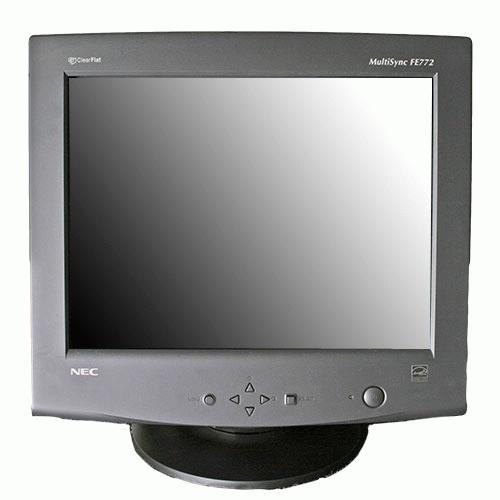
1) This is a monitor:

Monitor

A monitor does one thing: it displays the image generated by the computer. It may be a CRT and be big and bulky, or it may use LCD technology making it slim and flat.

It is NOT the computer itself.

2) This is a computer:

Tower computer

Note that it has a CD drive in the front of it – as a general rule, if it is bigger than a copy of Harry Potter and has a CD tray, and is not a DVD player for your home, then it is a computer.

This is the part that actually does all of the work. While it may have a dial-up modem built into it, it is still not a modem, it just uses one.

There are many brands of computers available on the market today from companies like Dell, Gateway, HP, and Compaq. If you buy a computer from one of these brands, it will be running a Microsoft Windows Operating System unless you tell them otherwise. They make it very hard to tell them otherwise, so you can pretty much take it for granted that you are running Windows.

3) There are several versions of Microsoft Windows (or just Windows) available. The one you will most likely encounter in the business environment is Windows XP Pro. At home, you will find Windows XP Home or Media Center Edition, or Windows Vista. It is possible to find Vista in the business, but most companies were smart enough to avoid it thus far.

You should too.

If you are not sure which version of Windows you have, reboot the computer and watch the monitor. A big logo should appear on the screen before it gets to the Desktop telling you which version you have.

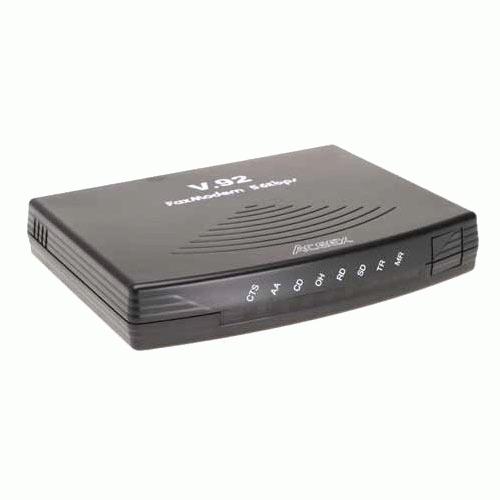
4) These are dial-up modems:

Internal
Internal modem, rear view

External
External modem

In older systems, you plug the phone line into this device to gain access to the Internet. If you have a modem, you must also have an account with an ISP. You gain access to the Internet by first having the computer tell the dial-up modem to call the ISP and log in. Once that is done, you may launch a Web Browser to view web pages in.

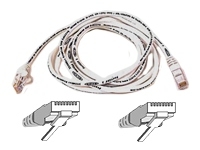
5) This is a network cable:

Ethernet cable

More specifically this is an Ethernet cable, but calling it a network cable will suffice. It looks very much like a phone cable on steroids – it is generally thicker, and has more pins than a phone cable. It will not fit into a dial-up modem like the ones pictured above. This is how most modern computers get connected to networks and from there to the Internet.

If you use one of these, your Internet connection will likely be always on, meaning you do not have to dial the ISP first – you just launch a Web Browser.

6) It is the Internet, not the Intarwebs, nor is it Internets (plural). These other two expressions are only allowed on LOLcat images.

7) This is a LOLcat site:

I Can Has Cheezeburger

LOLcats are pictures of cats with funny captions that make us laugh. If you don’t get this, I don’t want to know you, for you are obviously a lower form of life.

8) To view a website full of LOLcats images, you will need a Web Browser. There are a number of different browsers available, but the one you will most likely encounter is called Internet Explorer. It is the big blue “e” icon on the Desktop.

If you call Tech Support, they may ask you to go to a specific website. This is done by typing the address of the website into the Address Bar of the browser. If you look at your screen right now, you will see a place that says “http://thecyberwolfe.com/blog/…” – that is the Address Bar. If you click the mouse in that area, you can delete whatever is there and type in something new. When you are done typing, pressing the “Enter” key on the keyboard will take you to the address you just typed.

This will do for the 101 course. Next, in the 102 course, you will find some tips for what to do when something doesn’t work.

Spelling is important

Mental note: when setting up a new mail server, double-check your spelling of names. Because sure as shit, the one name you mispell is going to be the one person who will neep about it incessantly until you go through and clear the names cache out of every email client in the organization.

Luckily for this particular idiot, there are only 5 computers in the org, so it didn’t take that long. But still.

Oi.

Apparently Jesus prefers Bud

I stopped in to fill up the tank and get a drink after work yesterday and noticed that the mini-mart had removed a rack of goodies and replaced it with a huge Budweiser display and a couple stand-alone knick-knack racks. Then I looked closely and saw this:

The shirt off his back

You’ll have to forgive the lousy picture (camera phone), but if you look closely you will see that it is one of those t-shirt racks that has a picture of the shirt next to the bin. Look even closer, and you will see that the entire thing is devoted to shirts extoling the virtues of Christ, done up to look like trendy shirts that you see hipster kids on Hawthorne wearing.

No shit – one of them even duplicates the Starbucks logo “Sacrificed…for your sins”

Needless to say, this gave me a serious WTF?!? moment. It got worse, however, when I went up to the counter and saw the ‘Royal Blunts’ rolling tubes (which no-one has ever used for tobacco – note the website), the big rack of ‘Energy’ pills (otherwise known as OTC speed) and the (I am really not making this up) “Screaming O” brand vibrating condom rings. And don’t forget all the beer next to the shirt rack.

Apparently, their hypocrisy knows no bounds.

Transformers attack my carpet!

I was looking at my living room the other day and realized that the current vacuum at Chez Wolfe was just not cutting it. Between my hair and Zoe’s, that poor old Royal was choking out. So, off I went to Stark’s Vacuums on Grand.

I’ve been drooling over the Dyson models, just because I appreciate fine engineering when I see it, but am a bit shy about dropping a minimum of $400 on a house-cleaning tool – no matter how well-engineered it may be. I explained this to my friendly sales rep, and laid out my requirements for a new machine:

  • Bagless
  • HEPA filter
  • Upright with onboard tools and extension hose
  • Powerful enough to dig the cat hair out of shag
  • Less expensive than a Dyson

I can’t remember the gent’s name, but his face kind of fell at that point because they don’t carry much in the way of bagless vacs other than Dysons. I was walking out the door when I spotted this funky looking Hoover: the Z upright.

The idea behind it is really kinda funky – it is a crossover vac. It folds in half from what you see in the picture so that it sits like a canister. The handle pops off and becomes the hose attachment point, and it comes with an extension and a brushless hard-floor tool. Or, stand it up and use it like a regular upright vac. A panel opens up on the side to reveal the cord and tool storage, and all the settings are electronic so it’s dead easy to operate.

We gave it a quick test on the sales floor and it looked like it would do the job. The real selling point, however, was that it was on sale for $139. Sold!

The final verdict: my carpets are now clean and biege, instead of dirty and black from cat hair. The cat, of course, is pissed, because she had put all that effort into shedding all over everything and now she has to start all over again :)

Update – just to roll it down a smidge.

The day after the previous post, I got a bit of a shocking email:

Someone at Symantec had seen my post, and then emailed me directly about it.

(stunned silence)

I have no delusions of grandeur here, I have seen my stats and I know that roughly 5 people ever read this blog – so I’m betting that someone in the PR dept over there must be tasked with Googling daily for bad press, and they must have showed it around the office, because I got more hits that day than I have in the past two months.

The thing is, the guy was genuinely trying to be helpful, and not once did he request that I take down the post, so I will give them an “E for Effort” in trying to resolve my issues. Of course, since I keep my professional life and my electronic alter-ego strictly separate, I had to reply in generalities, so I don’t expect to see any immediate change.

There is always hope for the next version, though.

Symantec sucks!

Installed Backup Exec v11d for a client yetserday, after finally jumping through enough hoops to register the serial number so I could download the product. (That was a hell all on its own.)

Get everything installed, and try to run a LiveUpdate – keeps failing on the first file. I figure we just need to reboot the server one last time, so I do so and go home (it was already after 5).

Today, I run LiveUpdate again – fails on the second file. Info box says I have to restart LU – so I do. This time it sees that the 1st update downloaded, and goes straight to #2 and finishes. Fails on #3.

And again on #4

And again on #6 – with another LU restart in between each failure. Somehow, it managed to make it all the way to number 8 after this, so it starts installing the updates. Another window pops up, this time saying the BE services have stopped.

O.o?

The box then brings up the BE “login to media server” box with a button for “Services”. Clicking this gets me a window with several buttons, one of which is “Start all services”. Clickety. Chug-chug-chug, click on OK. Then it makes me log back in to the media server, and of course it hasn’t saved the password. Once that goes through, it pops up 11 (ELEVEN!!) informational windows saying it restarted the various services and that I will need to reboot to finish the update.

It then goes through this same ridiculous process for EVERY FUCKING UPDATE IT INSTALLED.

And we paid how much for this barely functional piece of shit that can’t even re-start its own services or download an update without handholding?

Just shoot me.